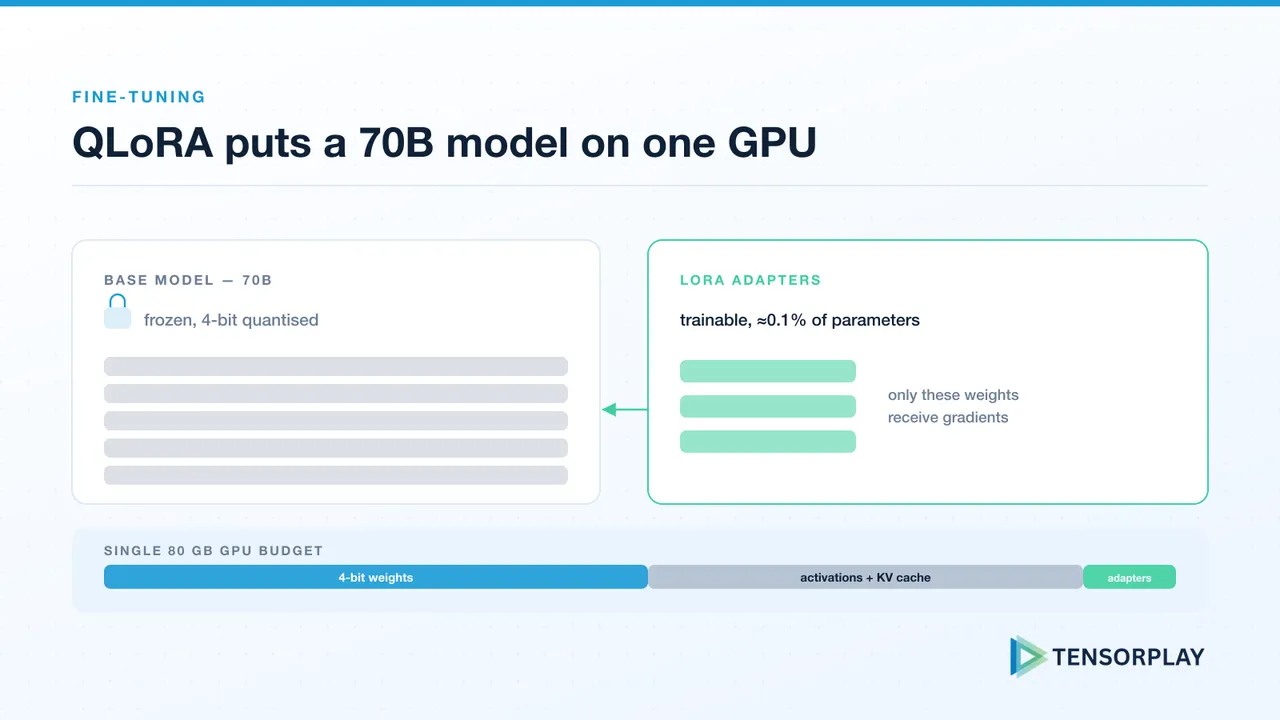
QLoRA (Quantized Low-Rank Adaptation) changed the economics of LLM fine-tuning. Before QLoRA, fine-tuning a 70B model required a cluster of A100s and a substantial cloud budget. With QLoRA, it fits on a single 80GB GPU — or even a 40GB GPU with some compromises.
Before you start, check that fine-tuning is the right tool: if the problem is missing or fast-changing knowledge rather than behaviour, RAG is usually the better choice. Here’s a practical walkthrough of the process we use at Tensorplay for client fine-tuning projects.
The Core Idea Behind QLoRA
QLoRA combines two techniques:
- 4-bit quantization: The base model weights are quantized to NF4 (a 4-bit format optimized for normally distributed weights), dramatically reducing memory footprint.
- LoRA (Low-Rank Adaptation): Instead of updating all model weights, we add small trainable adapter matrices to specific layers. These adapters are a tiny fraction of the total parameter count.
The result: you train only ~0.1-1% of the parameters, while the frozen quantized base model provides the language understanding. Memory during training is dominated by the adapters and optimizer states, not the full model.
Data Preparation is the Most Important Step
Fine-tuning quality is overwhelmingly determined by data quality, not hyperparameter tuning. For every fine-tuning project, we invest heavily in:
- Data curation: Remove examples that are off-distribution, factually incorrect, or poorly formatted. A smaller, cleaner dataset consistently outperforms a larger noisy one.
- Format consistency: Every training example should follow the exact same prompt template. Use the same template at inference time.
- Deduplication: Near-duplicate examples cause the model to memorize specific instances rather than generalize. Use MinHash LSH or similar to deduplicate.
For most task-specific fine-tuning, 1,000-10,000 high-quality examples is sufficient. More data rarely helps if quality is maintained.
Key Training Configuration
import torch
from transformers import BitsAndBytesConfig
from peft import LoraConfig

# Quantization config
bnb_config = BitsAndBytesConfig(
    load_in_4bit=True,
    bnb_4bit_quant_type="nf4",
    bnb_4bit_compute_dtype=torch.bfloat16,
    bnb_4bit_use_double_quant=True,
)

# LoRA config
lora_config = LoraConfig(
    r=16,                  # rank - higher = more capacity, more memory
    lora_alpha=32,         # scaling factor
    target_modules=["q_proj", "v_proj", "k_proj", "o_proj"],
    lora_dropout=0.05,
    bias="none",
    task_type="CAUSAL_LM",
)
Start with r=16 and increase if your validation loss plateaus. Target all attention projection matrices, not just q and v, for better results on complex tasks.
Evaluation Before and After
Before training, run your evaluation suite on the base model to establish a baseline. If you don’t have one yet, our LLM evaluation framework covers how to build it. After training, compare carefully: fine-tuned models often improve dramatically on the target task while degrading on general tasks — this is expected and acceptable if you only need the target task.
Watch for catastrophic forgetting: if your model needs to maintain broad capabilities alongside the new skill, use a training dataset that includes examples representative of those general capabilities.
Fine-tuning is powerful but requires careful data work and rigorous evaluation. Serving the result efficiently is its own project; our guide to GPU inference on a budget covers serving frameworks and quantisation for deployment. If your team has a specific task that a fine-tuned model would solve better than prompt engineering, talk to Tensorplay about the options.